
CRM for Law Firms and Professional Services: Stop Managing Clients in Email Threads
Every partner at a law firm or professional services business has experienced this moment: a client calls to ask about the status of their matter, and the answer requires searching through three email threads, two WhatsApp conversations, and a handwritten note from a colleague’s desk. It takes 20 minutes to piece together an answer that should take 20 seconds.
Email threads are not a client management system. They are a communication tool being used as one — and the gap between what email can do and what your clients and practice actually need is costing your firm in lost time, missed opportunities, and client satisfaction. Here is what a CRM built for professional services solves, and why 2026 is the year to make the transition.

The True Cost of Managing Professional Service Clients in Email
Research shows that knowledge workers spend an average of 2.5 hours per day managing email — and for professional services firms where every hour is billable, this represents one of the single largest efficiency drains in the business.
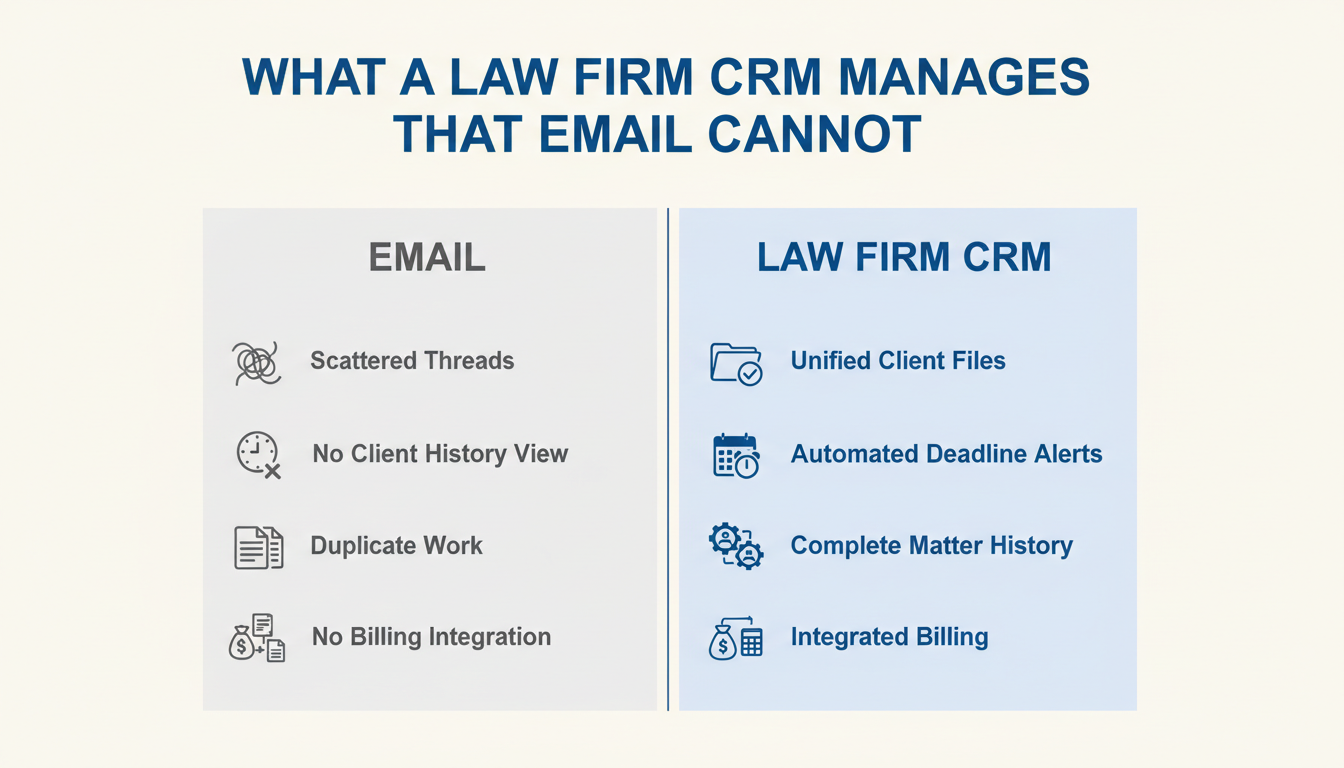
Beyond time, managing clients in email creates structural risks that a CRM eliminates: missed follow-ups when an email gets buried; no visibility into client status for other team members; no audit trail of client communications for compliance or dispute resolution; no early warning system for clients at risk of churning; and no systematic way to identify upsell or cross-sell opportunities within your existing client base.
Each of these problems is solved by a CRM. None of them are solved by a better email organisation system, a new folder structure, or a stricter email discipline policy. They are structural problems that require a structural solution.
What a CRM for Professional Services Actually Manages
A CRM for law firms and professional services firms centralises every client interaction, matter detail, deadline, document, billing milestone, and communication history into a single, searchable, team-accessible record — accessible by any authorised team member at any time.
The core functions that transform professional services operations:
- Unified Client Record: Every interaction — email, WhatsApp, call, meeting note — is attached to the client’s record. Any team member can see the full relationship history in 30 seconds.
- Matter and Case Tracking: Each client matter has its own pipeline stage, deadline tracker, assigned team member, and document repository — visible at a glance across all active matters.
- Automated Deadline and Follow-Up Alerts: Deadline-critical reminders fire automatically for both staff and clients. No matter falls through because someone forgot to check their calendar.
- Client Communication Automation: Status updates, document request reminders, appointment confirmations, and billing milestone notifications are all automated — freeing fee-earners from administrative follow-up tasks.
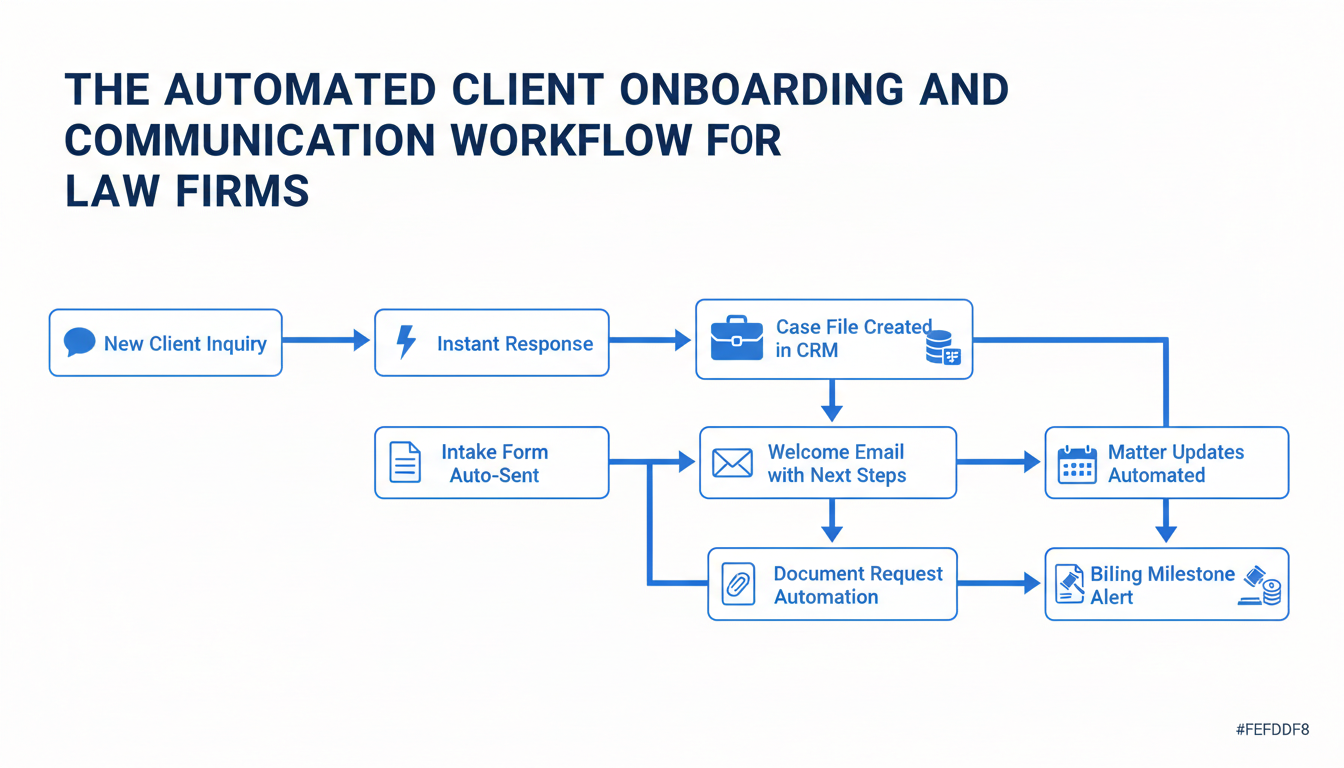
- New Client Intake Automation: When a new enquiry arrives, an automated intake workflow fires: an immediate acknowledgement, a digital intake form, a conflict check prompt, and an onboarding checklist — all before the first meeting.
The Automated Client Journey for a Professional Services Firm
From the first enquiry to the final invoice, an AI CRM can automate 60–70% of the client management touchpoints that currently require manual staff time — without reducing the quality or personalisation of the client experience.
A new client enquiry arrives via your website, WhatsApp, or phone. An automated response fires within 2 minutes: “Thank you for reaching out to [Firm Name]. We have received your enquiry and a member of our team will contact you within [timeframe]. In the meantime, please complete our brief intake form so we can prepare for our conversation: [Link].”
The client completes the intake form. A case file is created in the CRM automatically, pre-populated with their details. The relevant practice area partner receives a notification with the enquiry summary and intake form responses. The initial consultation is scheduled through an automated calendar link. A welcome email confirms the appointment and outlines what to expect.
After the initial consultation, if the client proceeds: the matter is opened, the fee agreement is sent digitally, the first billing milestone is set, and the client is added to a communication sequence that provides regular matter updates at appropriate intervals without requiring a fee-earner to draft them manually each time.
What the Results Look Like: Professional Services Firms Using CRM
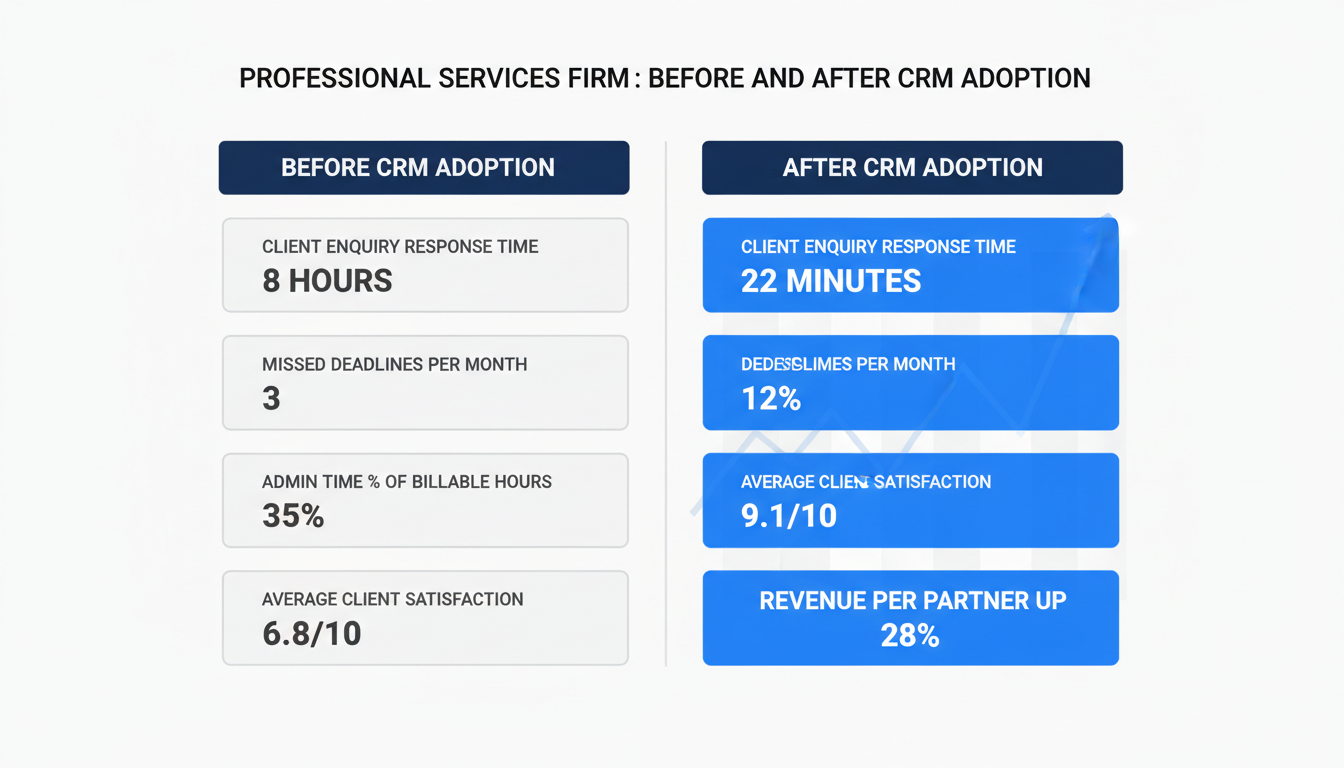
Law firms and professional services businesses that transition from email-based client management to a CRM consistently report the same cluster of improvements within the first 90 days: dramatically reduced administrative time, measurably higher client satisfaction, fewer missed deadlines, and increased revenue per fee-earner.
Typical outcomes within 6 months of CRM adoption: client enquiry response time from 6–8 hours to under 30 minutes; missed deadlines or follow-ups from 3–5 per month to zero; administrative time as a percentage of total billable hours from 30–40% to 10–15%; client satisfaction scores improving by 25–40%; and revenue per fee-earner increasing by 20–35% because more time is spent on billable work rather than administration.
What to Look For in a CRM for Professional Services
Not every CRM is built for professional services contexts. The features that matter most for law firms, consulting practices, accounting firms, and other professional services businesses are distinct from those prioritised in a typical sales CRM.
Essential professional services CRM features: client and matter relationship mapping (the ability to link multiple matters to a single client, and multiple contacts to a single matter); document management integration; time and billing module or integration with existing billing software; automated compliance and deadline tracking; client portal access for document sharing and status updates; and robust activity logging for every client communication. Beyond these core requirements, the most valuable additional feature for professional services firms in 2026 is AI-powered insight: identifying which clients are at risk of churning, which matters are approaching billing milestones, and which clients represent the highest upsell or referral potential.
Frequently Asked Questions About CRM for Law Firms
Is CRM adoption disruptive for a firm already operating in email?
The transition requires a commitment period of 2–4 weeks as team members adapt. The disruption is real but temporary. The efficiency gains from month 2 onwards consistently outweigh the transition investment for every firm that commits fully to the change.
Can a CRM handle the confidentiality requirements of legal practice?
Yes. Enterprise-grade CRM platforms offer role-based access controls, data encryption, and audit trails that meet the confidentiality and data handling requirements of legal practice. Always verify specific compliance requirements with your jurisdiction’s professional rules.
How do we handle existing client data during migration?
Most CRM platforms include migration support for importing existing contact and matter data. A managed migration typically takes 1–3 weeks depending on data volume and complexity.
Your Clients Deserve Better Than an Email Thread. Your Team Does Too.
The move from email-based client management to a CRM is not a technology upgrade — it is an operational transformation. The firms that have made this transition consistently describe it as one of the highest-impact decisions they have made for client satisfaction, team wellbeing, and business growth.
Ready to find out what a CRM transition looks like for your firm? Get a Free SEO / Website Audit from Nexurate Technologies — and walk away with a clear assessment of your current client management gaps and a practical roadmap to closing them.
